
Point-of-sale software for retail and restaurantsA fast, low-click checkout that always matches your stock.
ADO ERP POS is part of the system, not a separate tool: every sale at the counter updates stock, books revenue and adds loyalty points immediately.
What slows down the checkout
Peak-hour queues
Slow item lookup and manual entry keep customers waiting.
No internet, no sales
Fully online software stops the counter when the connection drops.
Cashiers change prices
No control over the price actually charged.
Late figures
Store revenue is only consolidated at the end of the day.
A POS designed for real operations
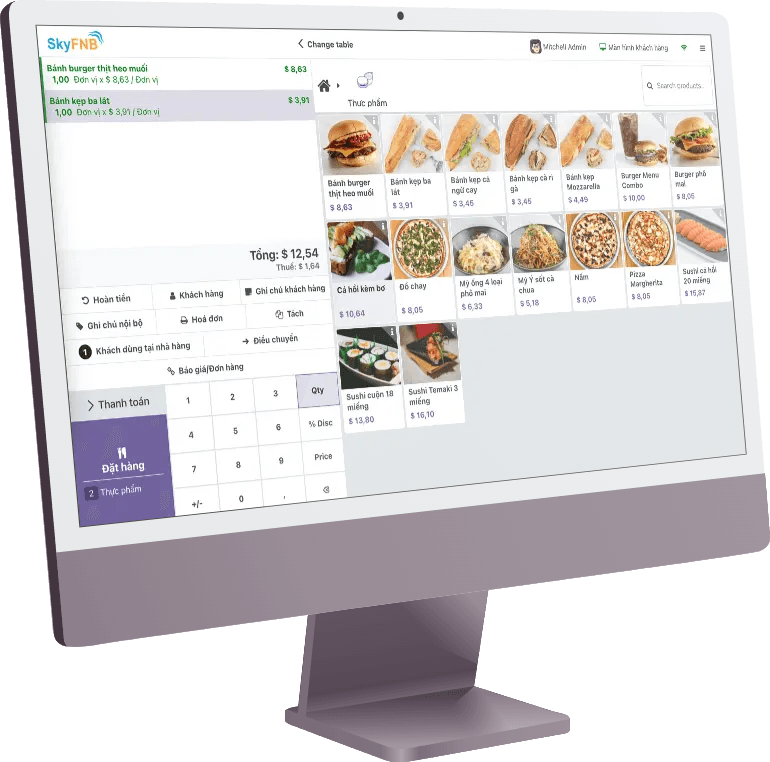
Fast barcode checkout
Find items by name or barcode across tens of thousands of products.
Resilient to network issues
Keeps selling and printing when the connection drops, syncs when it returns.
Price lock
Cashiers cannot change prices outside the approved policy.
In-store receipts
Custom receipt layouts, local printers and VND rounding.
Customer loyalty
Points, tiers, bundles and price lists at the counter.
Restaurant POS
Floor plans, orders sent to the kitchen, kitchen and bar displays.
One POS for several business models
Retail & pharmacy
Fewer clicks for cashiers, shorter waits for customers.
- Item lookup — by name, barcode or active ingredient.
- Pharmacy — customer receipt history at the counter.
- Payments — several methods on one receipt.
Restaurants & cafés
From table to kitchen on the same system.
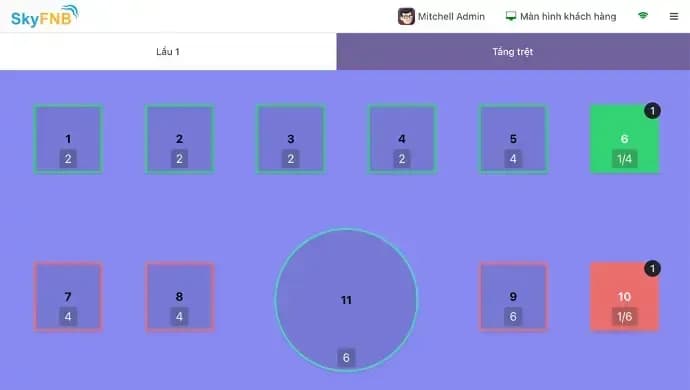
- Floor plan — table status in real time.
- Kitchen display — new orders appear instantly for kitchen and bar.
- Combos — customers choose dish components.
Reports & reconciliation
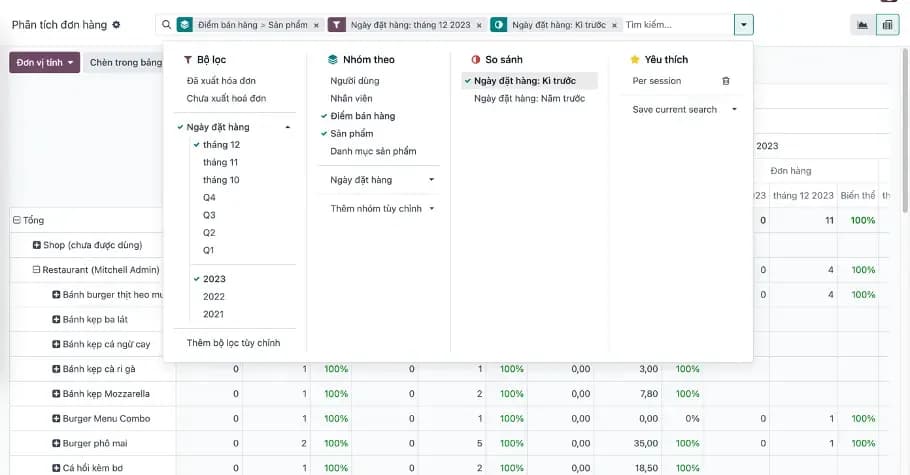
Owners see every store’s revenue in real time.
- Revenue — by store, shift, cashier and item.
- Shift closing — cash and payment methods reconciled.
- Connected — sales flow straight into inventory and accounting.
POS runs in production across branches at Golden Mouse
- Retail, pharmacy and restaurant POS on one system
- Golden Mouse
- Separate accounting and access rights per store
- Multi-branch
- Every receipt updates stock and revenue immediately
- 1
Questions about POS software
Still have questions?
An ADO ERP consultant will walk through your business case with you — free, 1-on-1.
+84 918 38 88 11Book a consultationCan we keep selling if the internet drops?
Yes. The POS keeps selling and printing on an unstable connection and syncs automatically when it returns.
Does it work for restaurants and cafés?
Yes. Restaurant POS includes floor plans, kitchen orders and kitchen displays. See the ADO F&B solution under Industries.
Can we use our existing receipt printers and barcode scanners?
Usually, yes. The team checks your hardware and configures printers and scanners during rollout.
Are there per-user licence fees?
No. There are no per-user licence fees and you fully own your data. Costs are quoted on the implementation scope after discovery.
More ADO ERP applications
CRM – Customer Management
DiscoverManage leads, opportunities and the sales pipeline; bring Zalo, Facebook, website conversations and calls into one customer profile.
Sales & Quotations
DiscoverQuotations, sales orders, price lists and discounts, product bundles, subscriptions and online sales; orders flow straight to inventory, delivery and accounting.
Inventory Management
DiscoverMulti-warehouse stock, branch transfers, lots and expiry dates, barcode counting and carrier integration; inventory data flows into sales and accounting.
Accounting & Finance
DiscoverAccounting on the Vietnamese chart of accounts, invoices and receivables/payables, financial reports; entries created from sales, purchasing and inventory; MISA meInvoice and Viettel S-Invoice e-invoicing.
HR & Payroll
DiscoverEmployee records, attendance, leave, contracts, recruitment and payroll under your own salary rules; payroll costs post straight to accounting.
Purchasing
DiscoverReplenishment suggestions, multi-level approval, purchase orders and receipts into stock, vendor bill matching and payables on one system.
See the POS with your own item catalogue
Book a 30-minute demo of checkout, loyalty and store reports.

The ADO ERP delivery approach
Start from a complete system
Begin with a proven, optimized solution instead of building from a bare Odoo installation.
Fastest hand-over
The first release covers 80–90% of requirements out of the box; customization is kept to a minimum.
Keep costs within budget
ADO ERP owns delivery and product design decisions to minimize time and maximize value for you.
Go digital with ADO ERP
Leave your details and one of our consultants will get back to you for a free 1-on-1 consultation within one business day.