
Custom Odoo ERP Implementation for Your BusinessA dedicated on-premise ERP system designed around the way your business actually runs
Every business manages its operations differently, and off-the-shelf software rarely fits perfectly. ADO ERP designs and customizes Odoo ERP systems to your specific requirements: on the flexible Odoo platform, we build bespoke modules and functions that cover your management needs end to end.
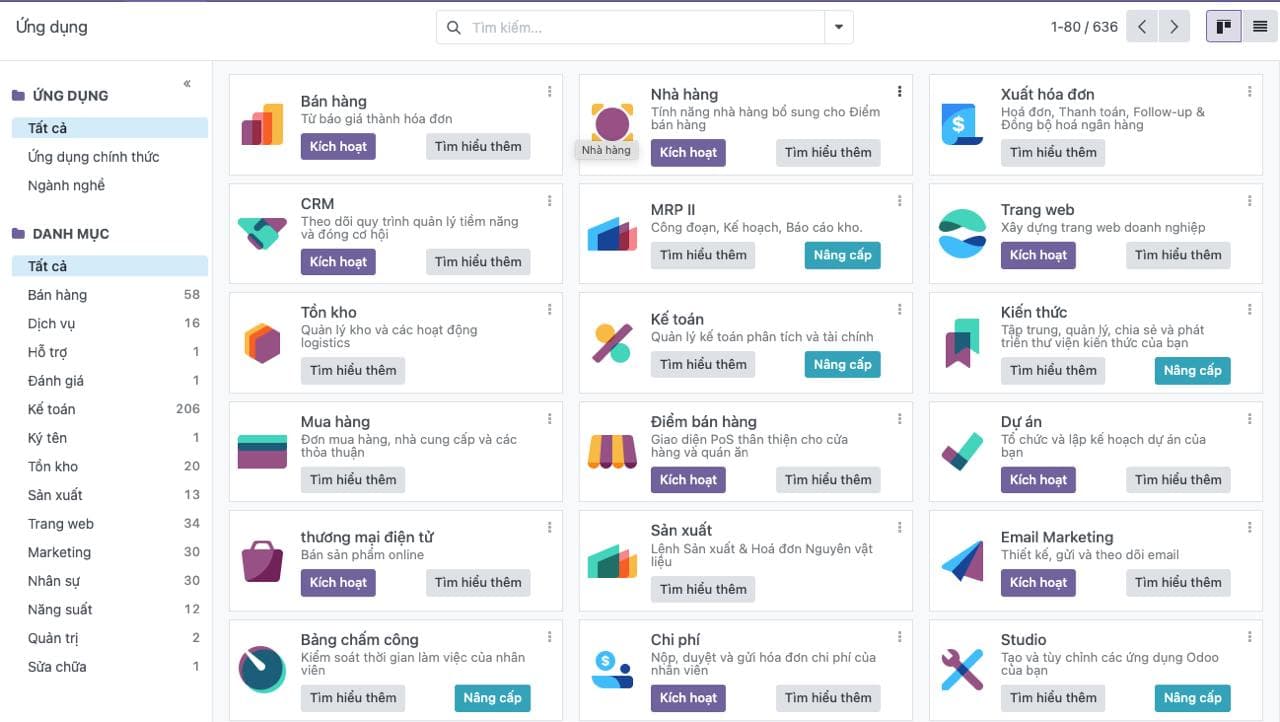
With you from needs analysis to scaling your ERP
ADO ERP takes care of the entire lifecycle of your Odoo ERP system, so you can focus on running the business.
Consultation and needs analysis
We analyze each company's management needs, then design and customize the ERP, building unique modules and features on the Odoo platform.
Implementation and training
A rigorous, well-planned rollout ensures smooth installation and operation, and in-depth training helps your staff master the new system quickly.
Support and maintenance
After go-live, ADO ERP stays with you through comprehensive support and maintenance services. Our technical team is ready to resolve issues and delivers regular updates so your ERP runs stably and securely.
Upgrades and expansion
We keep developing new solutions to upgrade and extend your system, helping you adapt quickly to market and technology changes, so your ERP remains a powerful tool for business growth.
ADO ERP's ERP Implementation Methodology
Three principles that get Odoo ERP projects live quickly, on budget, and actually used.
- 01
Start from a robust, feature-rich foundation
ADO ERP has built a library of fully compatible features covering financial accounting, HR, manufacturing and project management. The system meets 80–90% of your needs immediately, typically cutting implementation time by 50% and costs by 30%.
- 02
Phased rollout for the fastest go-live
We split the project into phases based on data dependencies or your operational priorities. Once phase 1 is complete, you can usually run core processes and start benefiting from the system.
- 03
Documentation, training and continuous support
An ERP project only succeeds if people can use it. We write project-specific user guides that are detailed, easy to follow and kept up to date, and we invest time in training and operational support so work is never interrupted.
Run your core processes from the very first phase
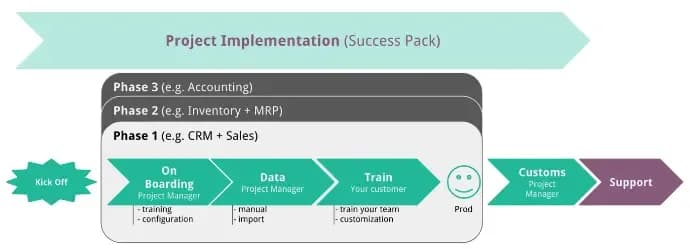
Instead of waiting for the whole system to be finished, ADO ERP delivers in phases (for example CRM and sales first, then inventory and manufacturing, then accounting). Each phase goes through:
- Kick-off and onboarding: system configuration and initial training
- Data: manual entry or import of existing data
- Training: training your team and customizing based on feedback
- Go-live: moving into production
While later phases are being delivered, we keep monitoring, supporting the go-live and making the necessary adjustments to earlier phases.
Project-specific documentation and training until users are confident
The biggest obstacle in many ERP projects is not the software but user adoption. A successful ERP project is one the customer can use effectively, so ADO ERP prioritizes thorough documentation and continuous support:
- Writes user guides tailored to your business, detailed and easy to understand
- Keeps documentation up to date as the project evolves
- Dedicates ample time to training and operational support, so every employee gets the help they need

What sets ADO ERP's custom Odoo ERP apart
80–90% of needs covered on day one
A ready-made feature library for accounting, HR, manufacturing and project management; only the remainder is built specifically for you.
Around 50% faster implementation
No need to rebuild proven features from scratch, so the project goes straight to what makes your business unique.
30% lower cost
Reusing compatible, pre-built modules significantly reduces development cost compared with full customization.
Benefits from phase 1
A phased rollout puts core processes into operation early, without waiting for the whole project to finish.
Your own on-premise system
Modules and functions are designed around your processes, so you never have to bend your operations to fit the software.
Support beyond go-live
Support, maintenance, regular updates, and upgrades as your business grows.
Odoo ERP systems built by ADO ERP serve more than 50,000 users



Questions about custom Odoo ERP implementation
Still have questions?
An ADO ERP consultant will walk through your business case with you — free, 1-on-1.
+84 918 38 88 11Book a consultationHow much of our business needs will ADO ERP's Odoo ERP cover?
ADO ERP's pre-built feature library (financial accounting, HR, manufacturing, project management) covers 80–90% of business needs right away. The rest is delivered as custom modules built to your requirements.
How long does a custom Odoo ERP implementation take, and what does it cost?
Time and cost depend on project scope. Because we start from an existing feature foundation, ADO ERP's approach typically cuts implementation time by around 50% and costs by 30% compared with building from scratch. Contact us for a tailored estimate.
When can we start using the system?
We roll out in phases. Usually, as soon as phase 1 is complete, you can run some core processes and start benefiting from the system while later phases are still being implemented.
Do you provide training and user documentation?
Yes. Every project gets its own user guides tailored to your business and continuously updated. ADO ERP also runs in-depth training and operational support so your staff master the system quickly.
What support do you provide after go-live?
ADO ERP continues with comprehensive support and maintenance: resolving technical issues, regular updates to keep the system stable and secure, and upgrades and extensions as your business changes.
Ready to build an Odoo ERP system of your own?
Tell us about your processes and management goals, and an ADO ERP expert will recommend the right scope and implementation roadmap.

The ADO ERP delivery approach
Start from a complete system
Begin with a proven, optimized solution instead of building from a bare Odoo installation.
Fastest hand-over
The first release covers 80–90% of requirements out of the box; customization is kept to a minimum.
Keep costs within budget
ADO ERP owns delivery and product design decisions to minimize time and maximize value for you.
Go digital with ADO ERP
Leave your details and one of our consultants will get back to you for a free 1-on-1 consultation within one business day.